NO.109 You create a canvas app for a service company.
Using the Tree view, you navigate to the ViewServices screen. The screen contains a form named DetailForm1 that only contains Label controls. You add the People icon to the header of the ViewServices screen as shown below:
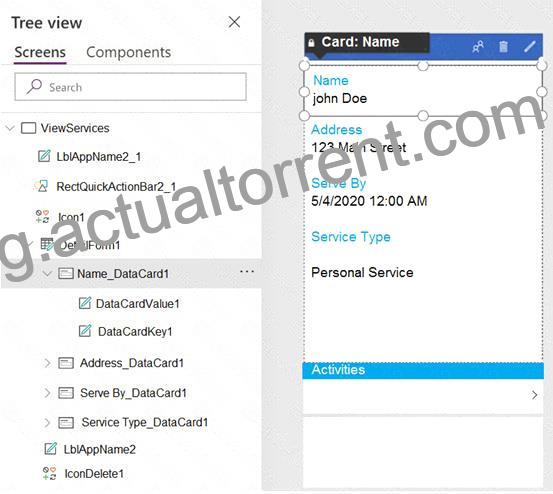
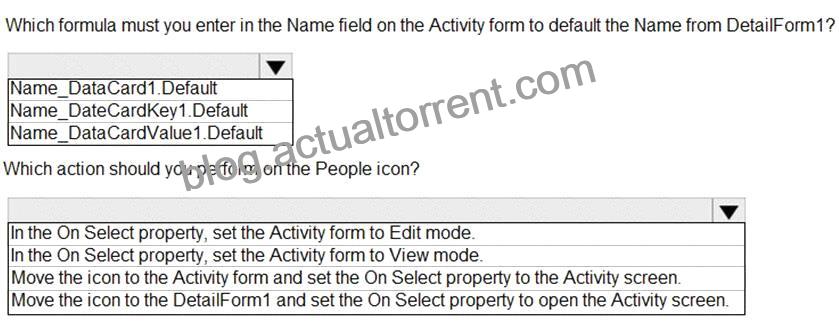
When you select the icon a new Activity form opens. You must set the value of the Name field on the new Activity form to the value of the name field from DetailForm1.
Use the drop-down menus to select the answer choice that answers each question based on the information presented in the graphic.
NOTE: Each correct selection is worth one point.
Explanation
Graphical user interface, text, application Description automatically generated
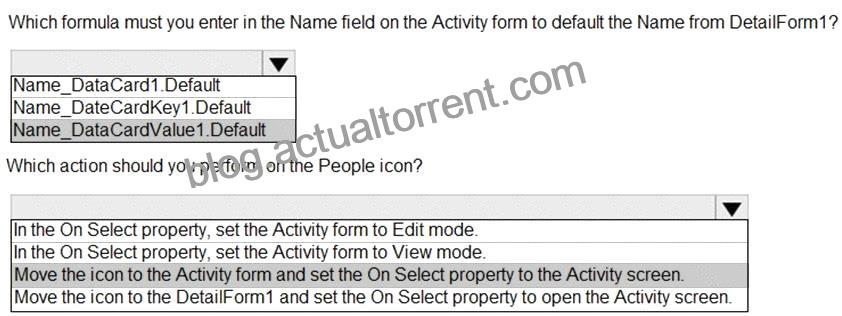
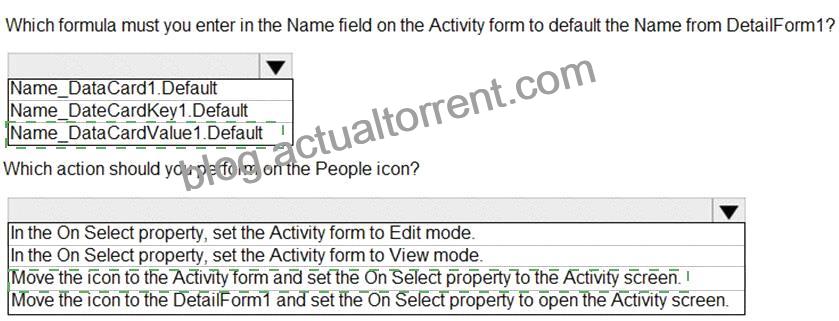
Box 1: Name_DataCardValue1.Default
Box 2: Move the icon to the Activity form and set the On Select property to the Activity screen.
The Select function simulates a select action on a control as if the user had clicked or tapped the control. As a result, the OnSelect formula on the target control is evaluated.
Reference:
https://docs.microsoft.com/en-us/powerapps/maker/canvas-apps/functions/function-select
NO.116 You create a canvas app for a store.
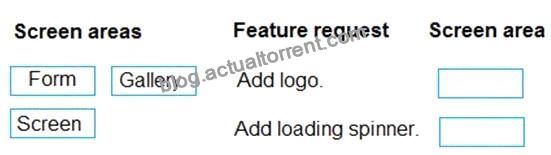
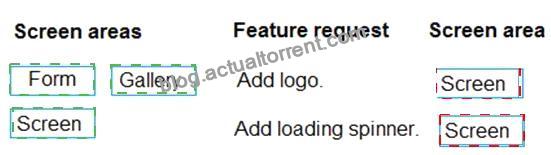
The logo must appear as the background image for the app. A loading spinner must display on the screen as the app loads.
You need to add the features to the app.
What should you modify? To answer, drag the appropriate form areas to the correct requests. Each form area may be used once, more than once, or not at all. You may need to drag the split bar between panes or scroll to view content.
NOTE:Each correct selection is worth one point.
Explanation
Graphical user interface, text, application Description automatically generated
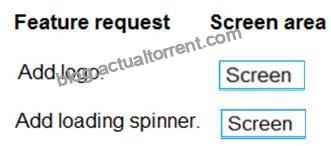
Box 1: Screen
You can add an image to a screen in several different ways. One way is to upload an image to the app, go to the Media tab, and then click on the image to add it to a screen.
Note: Configure graphical elements in your app, including images, photos, and elements of a pen control.
BackgroundImage – The name of an image file that appears in the background of a screen.
Applies to the Screen control.
Box 2: Screen
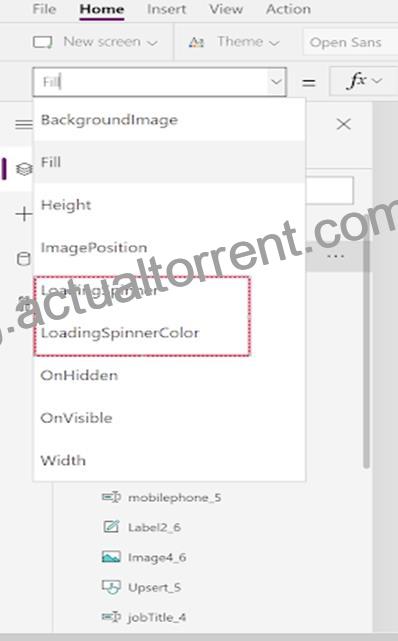
Out Of Box Canvas App, provide a property called LoadingSpinner and LoadingSpinnerColor.
LoadingSpinner property is used to displaying a Canvas App OOB Loader Image unless your screen finishes loading.
Click on the Screen in your Canvas App and then You’ll be able to see LoadingSpinner and LoadingSpinnerColor Property.
Graphical user interface, application Description automatically generated
Reference:
https://docs.microsoft.com/en-us/powerapps/maker/canvas-apps/controls/properties-visual
https://arpitmscrmhunt.blogspot.com/2020/04/powerapps-display-loading-icon-until.html
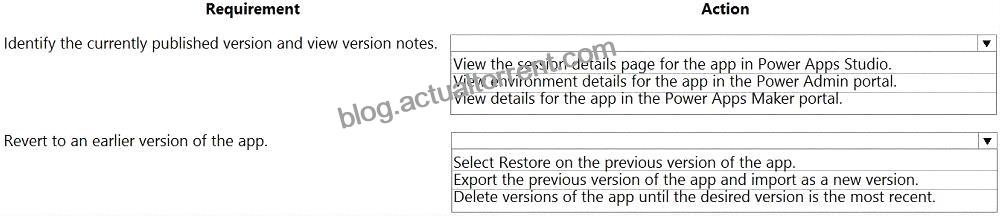
NO.118 You need to roll back the mobile app to an earlier version.
What should you do? To answer, select the appropriate options in the answer area.
NOTE: Each correct selection is worth one point.
Explanation
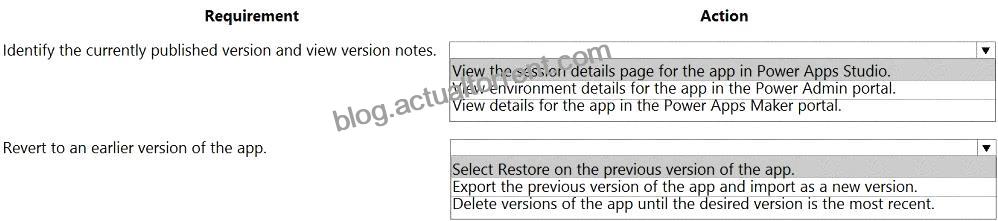
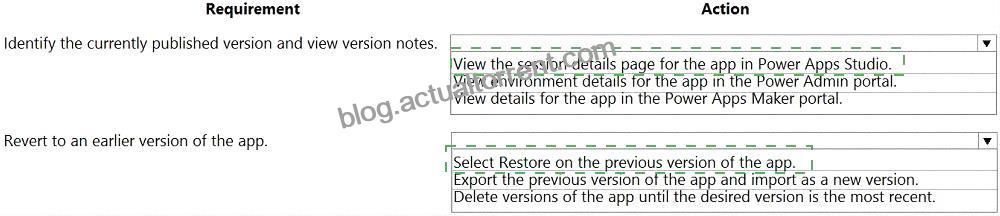
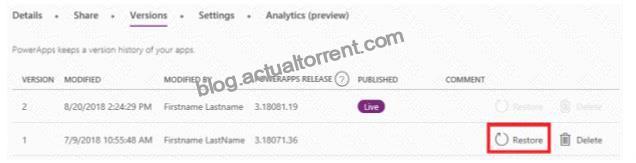
Box 1: View the sessions details page for the app in Power Apps Studio
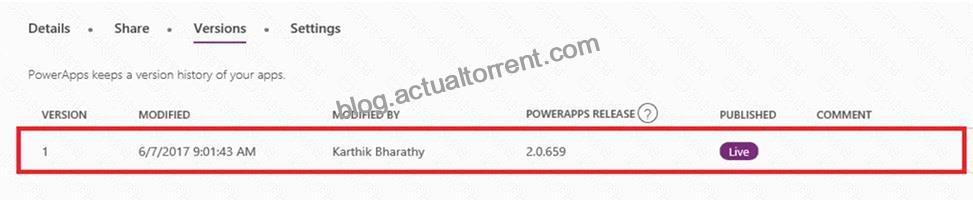
Use PowerApps Studio, select the App, and choose and you will be directed to the app’s Versions tab in PowerApps portal. There should be one version marked Live.
Box 2: Select Restore on the previous version of the app.
Restore an app from your account
* Open powerapps.com, and then click or tap Apps in the left navigation bar.
* Near the right edge, click or tap the info icon for the app that you want to restore.
* Click or tap the Versions tab, and then click or tap Restore for the version that you want to restore.
Reference:
https://powerapps.microsoft.com/sk-sk/blog/saveandpublish/
https://docs.microsoft.com/en-us/powerapps/maker/canvas-apps/restore-an-app
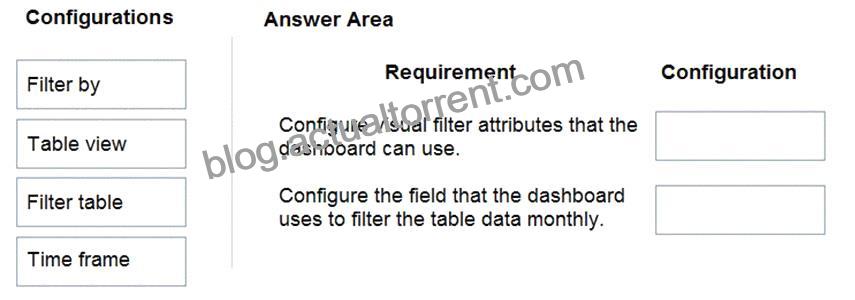
NO.120 The company is adding a multi-stream interactive dashboard to a model-driven app.
The company requires configuration of the dashboard to filter the table data based on modified accounts over the last month.
You need to configure the filters for the model-driven app dashboard.
Which configuration should you use? To answer, drag the appropriate locations to the correct requirements.
Each configuration may be used once, more than once, or not at all. You may need to drag the split bar between panes or scroll to view content.
NOTE:Each correct selection is worth one point.
Explanation
Graphical user interface, text, application Description automatically generated
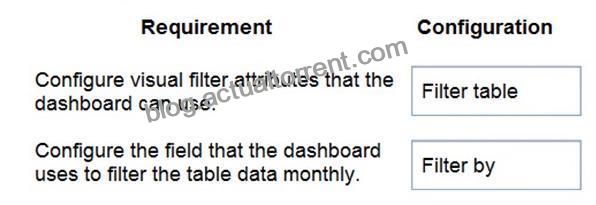
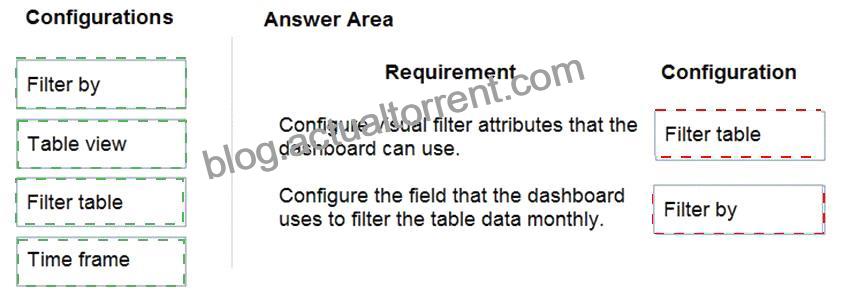
Box 1: Filter table
Filter Table: The visual filters and global filter attributes are based on this table.
Box 2: Filter By
Filter By: The column that the time frame filter applies to.
Reference:
https://docs.microsoft.com/en-us/powerapps/maker/model-driven-apps/configure-interactive-experience-dashboa
NO.121 A company has an on-premises system that stores product information. The company plans to replace the information with a Power Platform solution that uses the Common Data Service.
The Power Platform solution needs to use data from the product information system.
You need to transform and import the data from the product information system.
Which two tools should you use? Each correct answer presents part of the solution.
NOTE: Each correct selection is worth one point.
The on-premises data gateway acts as a bridge to provide quick and secure data transfer between onpremises data (data that isn’t in the cloud) and several Microsoft cloud services. These cloud services include Power BI, PowerApps, Power Automate, Azure Analysis Services, and Azure Logic Apps. By using a gateway, organizations can keep databases and other data sources on their on-premises networks, yet securely use that on-premises data in cloud services.
Can use the Power Platform dataflows to load entity in CDS with the option to transform data.
Reference:
https://docs.microsoft.com/en-us/power-bi/connect-data/service-gateway-onprem
https://nishantrana.me/2020/07/07/load-data-from-sql-on-premise-to-cds-common-data-service-using-powerplatform-dataflows-in-power-apps/
Topic 1, Contoso, Ltd
Current environment
Overview
Operations for the company are managed very informally. Only a small number of long-term employees are aware of all manufacturing processes.
Accounting system and purchasing
The company has a cloud-based ERP/accounting system and uses the General Ledger, Accounts Receivable, and Accounts Payable modules. The current system does not have any modules that handle shop floor or manufacturing planning functionality.
Employee information is maintained only within the accounting system. Access to the information is strictly controlled due to privacy regulations and company policies.
All purchasing of raw materials is performed based on bills of material (BOMs) generated by the engineering department when engineering prints are created.
The corporate office uses Dynamics 365 Finance. The operations manager reports that Dynamics 365 Finance will not be implemented for the manufacturing plants for at least five years.
Manufacturing and planning
The plant that Contoso, Ltd. acquires uses Microsoft Excel workbooks and Microsoft Word documents to track the sales pipeline, requests for quote responses, and work estimates. The documents are stored on shared network drives.
Printed engineering drawings are sometimes accidently used across orders. This results in rework, cost over runs, and missed deliveries.
The company uses Job Traveler documents to detail the operations that need to be performed and the materials needed for a given job number.
Sales
Requests for quotes are currently stored in a Sales Log workbook. The workbook includes the following information:
Customer request number
Customer name
Description
Estimated value of the sale
Status of the Request for Quote (RFQ) with the values of Won, Lost, No Bid, and Cancelled Names of the sales manager, salesperson, and estimator Name of the product line Date the quote was sent to the customer Approximate start and finish dates of the project Date the order was received, if won Job number, which is assigned if won The company has a formal process in place for managing estimates. Some sales quotes lack required supporting documentation including estimates for labor and materials even though a formal process is in place. The company wants to incorporate the formal process as part of an app.
Salespeople often do not set status of RFQs in the Sales Log to Won when a sale is closed and the customer purchase order is received.
An accurate sales pipeline and win/loss information cannot currently be reported because the close probability field in the Sales Log is being set to 100% when a sale is closed and 0% when a sale is lost.
Setting up a folder system on the network drive by a customer had not improved the hand-off of the current version of the sales quote to manufacturing.
Requirements
Solution
You plan to create a solution that uses Microsoft Teams and Power Platform.
You must convert the Sales Log workbook to a Common Data Service database.
Each department will have a separate Teams channel. Employees must only be able to access the channel for their department. All employees and management will have read access to a general company channel. The Teams site must include the following channels:
Sales
The Sales dashboard must reside in the Sales channel and must include information about active quotes, sales pipeline, and year-to-date sales KPIs for sales quotas by region.
All Sales-related documents must be stored in folders in the files location for this channel. Document versioning will be enabled. You must store the 10 most recent versions of a document.
Manufacturing
A dashboard that shows a capacity Heat map by month as well as expected sales that are likely to close for the next month.
A sortable listing of all in-process jobs from the Job Setup table, by customer, start date, and product.
Printed paper drawings must no longer be used. The drawings must be stored in folders in the files location for the manufacturing channel.
General
You must create the following apps:
Time Tracking
You must create a canvas app to track time for each employee on mobile devices. The app must include the following:
a Sign-in screen
a screen to list the week’s time entries for the employee
a screen to edit current time entries for the employee
The app must meet the following requirements:
The app must store its data in the existing on-premises Microsoft SQL Server instance.
Employees must only be able to access their own time tracking records from the app.
Employees must record all time spent in the fabrication of each customer job.
Employees must only be able to modify time records for the current and previous day.
Employees must be able to scan their badges to check in and out of work. Each badge contains the employee name and a current picture.
A QR code must be added to all employee badges. The code must include the employee’s number.
Job Traveler documents must be printed as PDF documents and must include UPC E barcodes for the job number and task number. The barcodes will be used with the time tracking application.
Sales
The Sales app must meet the following requirements:
Provide a central location for all sales pipeline and quote information that is easily accessible and maintains all of the versions of the estimate, quote, and engineering documents.
Include a dashboard that shows all currently active quotes, their status in the sales cycle, the probability of closing, and estimated manufacturing and installation dates, by customer, product division, status, and salesperson.
The Sales Log app must enforce process standards related to the completion of estimates and supporting materials needed during the sales lifecycle.
Automatically perform the following actions immediately when a sale is won:
Generate a sequential job number.
Copy key sales information to the Job Setup entity used by manufacturing.
If the sale is lost, the Status field must be set to Lost and the reason for the loss must be entered into a provided text field. The reason must be added to the end of the description field.
Ensure that employees can easily update the Sales Log even if they are at a customer site.
Manufacturing and planning
The app must meet the following requirements:
Provides features to plan and predict capacity resource requirements for current and upcoming orders in the pipeline.
Replace paper timesheets and track check-in, check-out, breaks, and the time spent on each job task.
Record time elapsed while performing work and for viewing of engineering drawings.
The Job Setup entity must store its data in the existing on-premises SQL Server instance.
Job Traveler documents must be generated as a PDF document and printed from the Job Setup entity.
Issues
Uses report that the customer request number is difficult to interpret. They request that you change the number to a system generated sequential number.
The operations manager reports that users often incorrectly sign in to the time tracking app. The operations manager asks that the time tracking app display the employee’s photo once they have scanned their badge.
Users want to be able to see their weekly total time entered from all screens.
Testers report that they can see time entries in the Time Tracker app, not just their own. Additionally, they can also edit any existing time entries.
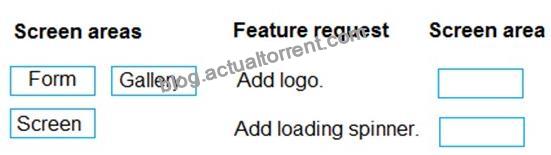
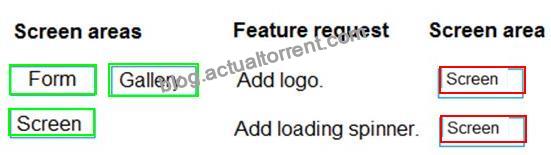
NO.126 You create a canvas app for a store.
The logo must appear as the background image for the app. A loading spinner must display on the screen as the app loads.
You need to add the features to the app.
What should you modify? To answer, drag the appropriate form areas to the correct requests. Each form area may be used once, more than once, or not at all. You may need to drag the split bar between panes or scroll to view content.
NOTE: Each correct selection is worth one point.
Reference:
https://docs.microsoft.com/en-us/powerapps/maker/canvas-apps/controls/properties-visual
https://arpitmscrmhunt.blogspot.com/2020/04/powerapps-display-loading-icon-until.html
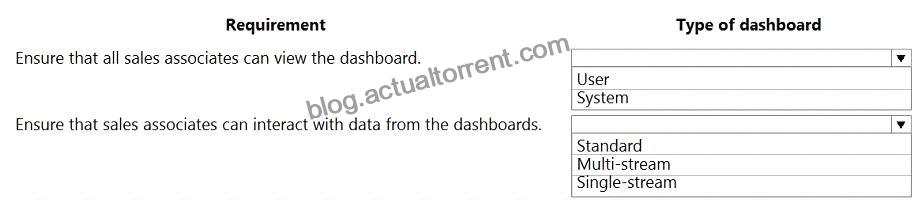
NO.129 An administrator plans to create and deploy dashboards for use only by sales associates. The dashboards will display the current sales pipeline, open cases, recent major wins, and key opportunities by postal code.
Sales associates must be able to act on the specific data displayed in dashboards.
You need to create the dashboards.
Which type of dashboards should you create? To answer, select the appropriate options in the answer area.
NOTE: Each correct selection is worth one point.
Explanation
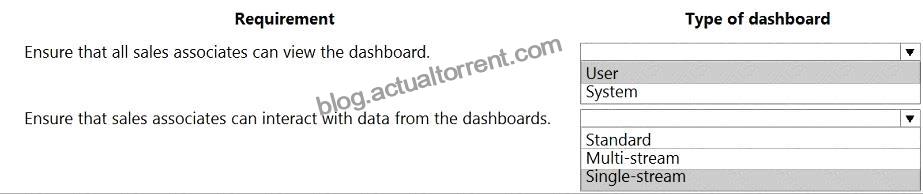
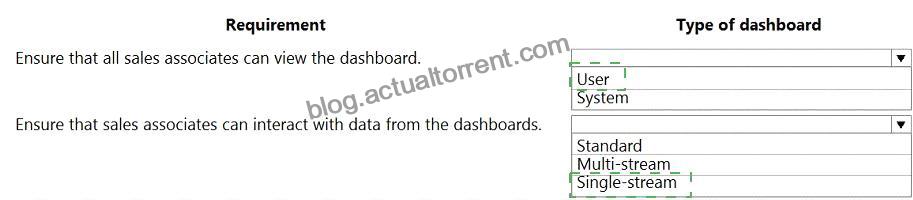
Box 1: User
Type of dashboard: If you want your dashboards to be available across the organization and do not want to manage the access levels at a more detailed level, you might want to create an organization-owned dashboard.
However, if you are concerned about the access privileges and security of your dashboard, consider creating a user-owned dashboard where you have more control on who can access it.
Box 2: Single-stream
The single-stream dashboards display real-time data over one stream based on an entity view or queue. The single-stream dashboards are typically helpful to Tier 2 service leads or managers, who monitor fewer, but more complex or escalated cases.
Reference:
https://docs.microsoft.com/en-us/powerapps/developer/model-driven-apps/create-dashboard
https://docs.microsoft.com/en-us/powerapps/maker/model-driven-apps/configure-interactive-experience-dashboa




Be the first to reply